
When it comes to preparing for your driving test, familiarising yourself with real test routes can make all the difference. Understanding the exact roads you’ll be driving on during your test helps reduce stress, boost confidence, and improve your chances of passing. One of the most efficient ways to do this is by using a test routes app.
But with so many test routes apps available, how do you know which one is right for your driving test preparation? In this guide, we’ll explain what to look for in a test routes app, highlight key features that make an app effective, and show how RouteBuddy can help you prepare more efficiently.

Why a Test Routes App is Important
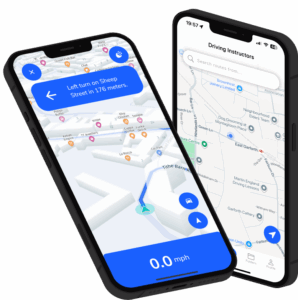
A test routes app provides real-time, turn-by-turn navigation on the actual routes used by examiners during your driving test. These apps offer a convenient way to familiarise yourself with real test routes, helping you feel more confident when it’s time for your exam. The DVSA states that knowing the routes you’ll encounter during your test is crucial for reducing test-day anxiety and boosting your performance.
For more details, visit the DVSA’s official page on 👉 What happens during the driving test
1. Look for Accurate and Up-to-Date Test Routes
The most important factor when choosing a test routes app is ensuring it provides accurate, up-to-date routes. Test routes can change due to roadworks, new traffic regulations, or local adjustments. A reliable test routes app should update routes regularly to reflect these changes.
Check if the app is regularly updated with the latest road information. Apps like RouteBuddy are designed to offer real-time, accurate routes used by examiners, ensuring your practice is as relevant as possible.
The DVSA recommends that learners practice on the real routes used by examiners to build familiarity. This helps you prepare for the driving test under realistic conditions.
2. Turn-by-Turn Navigation for Better Route Familiarity
One of the best features a test routes app can offer is turn-by-turn navigation. This feature helps you follow the exact driving test route as you would during the test, providing step-by-step directions just like a sat-nav.
Turn-by-turn navigation is especially useful for learners who are unfamiliar with certain areas. It helps you focus on driving safely rather than worrying about whether you’re on the right track. The DVSA also highlights how important it is for learners to drive confidently and independently during the test, which makes turn-by-turn navigation a great training tool.
For more on independent driving, see the DVSA’s guide on 👉 independent driving.
3. Look for a User-Friendly Interface
A test routes app should have a simple and intuitive interface. If the app is difficult to navigate or overly complicated, it can distract you from focusing on your driving. Choose an app that is easy to use and helps you focus on the important task at hand, driving.
Apps like RouteBuddy are designed with learner drivers in mind, offering a clear interface and easy-to-follow instructions. The app should allow you to start practising with just a few taps, making it accessible for all levels of experience.
4. Check for Independent Driving Practice Features
Many driving test route apps are great for following routes, but it’s important to practice the independent driving section of your test too. This part of the driving test requires you to follow either sat-nav instructions or road signs without any input from your examiner.
Look for an app that offers independent driving practice by using sat-nav navigation. With RouteBuddy, for example, you can practise real routes with sat-nav instructions, helping you prepare for this crucial part of the test.
The DVSA provides helpful information on what to expect during the independent driving part of the test, which you can find here: 👉independent driving.
5. Choose an App with Progress Tracking and Feedback
Some test routes apps offer features that allow you to track your progress. This can include monitoring how quickly you complete a route, how accurately you follow the directions, and whether you’re adhering to road safety standards.
An app with progress tracking helps you assess your strengths and weaknesses, enabling you to focus on areas that need improvement. For example, RouteBuddy offers progress tracking that lets you see how often you practise specific routes, how long it takes, and where you can improve.
6. Check for Compatibility with Your Vehicle’s Navigation System
Another important feature to look for is compatibility with your car’s navigation system. Many modern cars are equipped with CarPlay or Android Auto, so it’s a great idea to choose a test routes app that works seamlessly with these systems.
RouteBuddy integrates with CarPlay and Android Auto, allowing you to follow the routes while keeping your phone safely out of reach, making it easier to focus on driving.
7. Look for an App with Customisation Options
Every learner has different needs and preferences, so it’s helpful to find an app that offers customisation options. This could include:
- Changing the voice settings
- Selecting specific routes or areas for practice
- Setting reminders for regular route practice sessions
Apps like RouteBuddy provide customisation features, allowing you to tailor the experience to suit your needs.
How RouteBuddy Fits the Bill
When it comes to choosing a test routes app, RouteBuddy ticks all the boxes. It offers real test routes, turn-by-turn navigation, and the ability to practise independent driving. Plus, it’s user-friendly, integrates with your car’s navigation system, and allows you to track your progress as you practise.
Here’s how RouteBuddy can help you prepare:
- Access Real Test Routes: RouteBuddy provides access to real UK test routes so you can practise the exact roads and junctions used by examiners.
- Turn-by-Turn Navigation: The app offers step-by-step guidance, allowing you to follow real test routes with ease.
- Independent Driving Practice: Prepare for the independent driving section of your test with sat-nav guidance.
- Progress Tracking: Track your progress with detailed feedback on your performance, helping you improve with each session.
Quick FAQs: Choosing the Right Test Routes App
Can a test routes app help me pass my test?
Yes, using a test routes app helps you get familiar with the roads and builds confidence, but it should be used alongside professional lessons to cover all areas of the test.
How often should I use a test routes app?
It’s recommended to practise on a test routes app regularly, focusing on different routes or areas that you find difficult.
Can I use a test routes app during the test?
No, you cannot use a test routes app during the test. It’s only for pre-test preparation.
Final Thoughts
Choosing the right test routes app is a crucial part of your driving test preparation. By using an app like RouteBuddy, you can practise real test routes, improve your independent driving skills, and feel more confident when test day arrives.
While no app can replace quality driving lessons, a test routes app provides the convenience, flexibility, and practice you need to ensure you’re fully prepared.